Data Management: keep the spine of your resilience program current
Load the core records once, refresh them on a schedule, and see every change before it lands, so the dependency graph behind the program stays true.
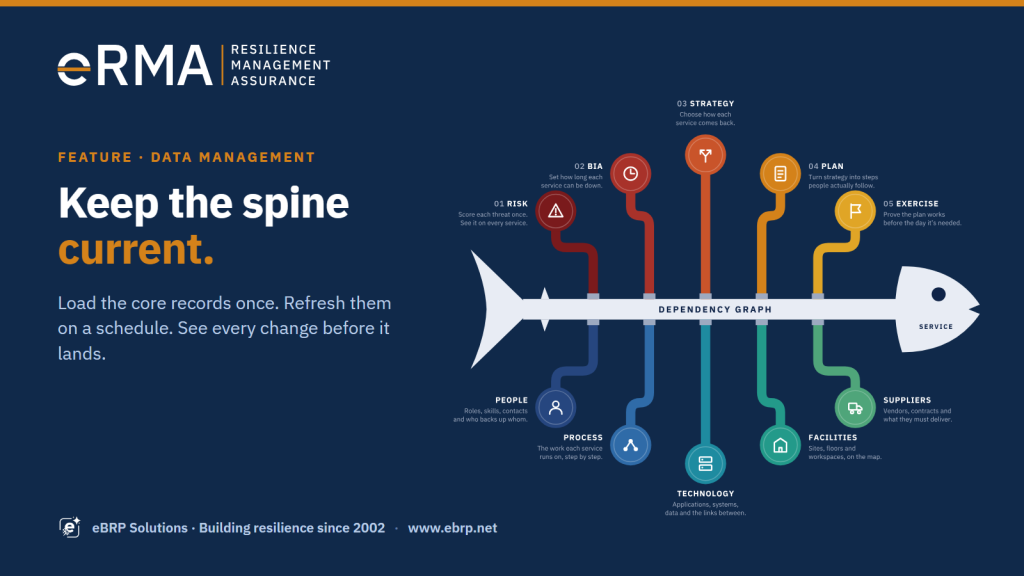
Every resilience answer runs along the same spine: the service at the head, and the people, processes, technology, facilities and suppliers it depends on. The impact of an outage, whether a plan can meet its RTO, who to call at 2 AM: each one is read from those records. Most programs load them once, at implementation, and then watch them age. People move, applications are retired, a supplier changes, two servers become one. Within a year the dependency graph describes a business that no longer exists. Data Management is how eRMA keeps the spine current.
The problem it solves
- “Everything was loaded at go-live. Nobody has touched the server list since.”
- “HR knows who left last month. The call tree doesn’t.”
- “Every bulk update is a weekend project, because nobody can see what the spreadsheet will change until it has changed it.”
How it works
1. Start with the records the spine is made of
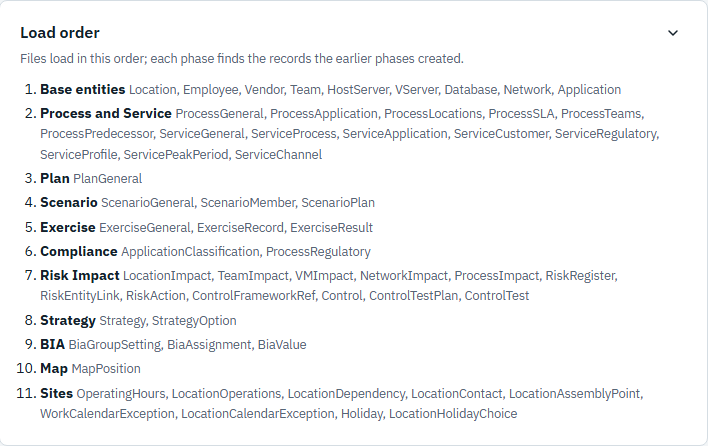
Data Management opens on the core entities, in the order they depend on each other: locations, employees, vendors and teams first; then hardware, virtual servers, databases, networks and applications; then processes and services; then the plans, scenarios, exercises and risks built on top of them. Each phase finds the records the earlier phases created, so links are resolved by business key, not by hand.
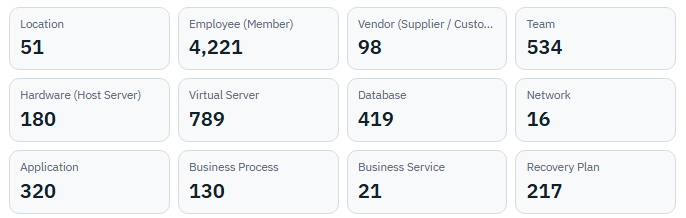
The overview shows how many records of each kind the program holds, so a gap in the spine is visible at a glance.
2. One published contract for every file
Every entity has a template and a field guide: the required columns, each column’s type and length, the allowed values, and the business key that identifies a record. The same definitions drive import, export and the pre-check, so a file built from the template today still loads next year. The pre-check reads each file as it is uploaded and flags a missing header, a blank required cell, a date that isn’t a date or a value outside the list, before anything runs.
3. See every change before it lands
Every import starts with a dry run. Per file, it reports how many records will be added, how many updated, how many left as they are, and which rows can’t be accepted, with the reason. Nothing is written until an administrator commits, and the commit is one transaction: all of it or none of it. On a live database a restore point is taken first. Update mode refreshes existing records in place, matched by business key, so a refresh changes what changed and nothing else.
4. Refresh on a schedule, not as a project
The systems that already know the truth keep the spine current: the HR feed, the CMDB extract, the vendor master. A schedule picks up their files from a drop folder daily, weekly or as soon as a file arrives. Each run starts with the same dry run and commits only when the result is clean and inside the limits its owner set: how many changes, how many deletions, what share of employees may be removed in one run. Anything outside those limits is held, not applied, and appears in the owner’s MyWorkspace with the reason. An employee missing from the HR feed is retired in the same gated run.
A check-only schedule answers “would this feed be clean today?” without changing anything: the safe way to bring a new source online before it is trusted to commit.
5. Take it all out, and back in
An export pack holds every file in load order, in exactly the template layout, with a manifest of what it contains. Re-import an unchanged pack and the dry run says: nothing to change. That round trip is the test that the contract is honest, and it makes the pack a portable copy of the program for a test environment, an audit or a move. Exports can run on a schedule too, to a folder, for reporting or an off-site copy. Every import and export is logged: who, when, what and how many rows.
Data Management is open to administrators only. Everyone else exports from their own list pages, and only the records they are allowed to read.
What it proves
The Impact Map, the business impact analysis, recovery strategies and plans all read the same records. Keep those records current and every answer built on them stays current: an outage traced today reaches the processes that exist today, and a call tree reaches the people who still work there. Change is visible before it lands, bounded when it runs on its own, and recorded afterwards. The spine stays true without a re-implementation every year.
Join an eRMA showcase: sixty minutes, live on Microsoft Teams. · Download the eRMA brochure: see the possibilities.